Connect ActiveCampaign to Myuser
Contacts, companies, notes, meeting tasks and deals - pipeline auto-created.
Push the people Myuser warms up straight into ActiveCampaign - contacts, companies, logged emails and booked meetings - so your automations can take over from there.
What the integration does
- Contacts: leads are upserted by email (no duplicates - ActiveCampaign's
contact/syncendpoint updates the existing record if the email is known). - Accounts: the lead's company is created as an Account and the contact is linked to it.
- Email + meeting logging: outreach emails and booked meetings show up as notes on the contact's activity stream, including the Myuser campaign name. When the contact has a deal, the meeting also lands as a Meeting-type task with the real time - visible in ActiveCampaign's task calendar.
- Deals + pipelines: Myuser creates deals (value, owner and stage set automatically). If your account has no pipeline yet, Myuser creates "Myuser Pipeline" with a "New Leads" stage for you - fresh trial accounts work out of the box.
- Master AI: your AI assistant can look contacts up in ActiveCampaign when you ask about a lead.
Total setup time: about 2 minutes. You need two values - a URL and a key.
Step 1 - Find your API URL and key
- Log in to ActiveCampaign.
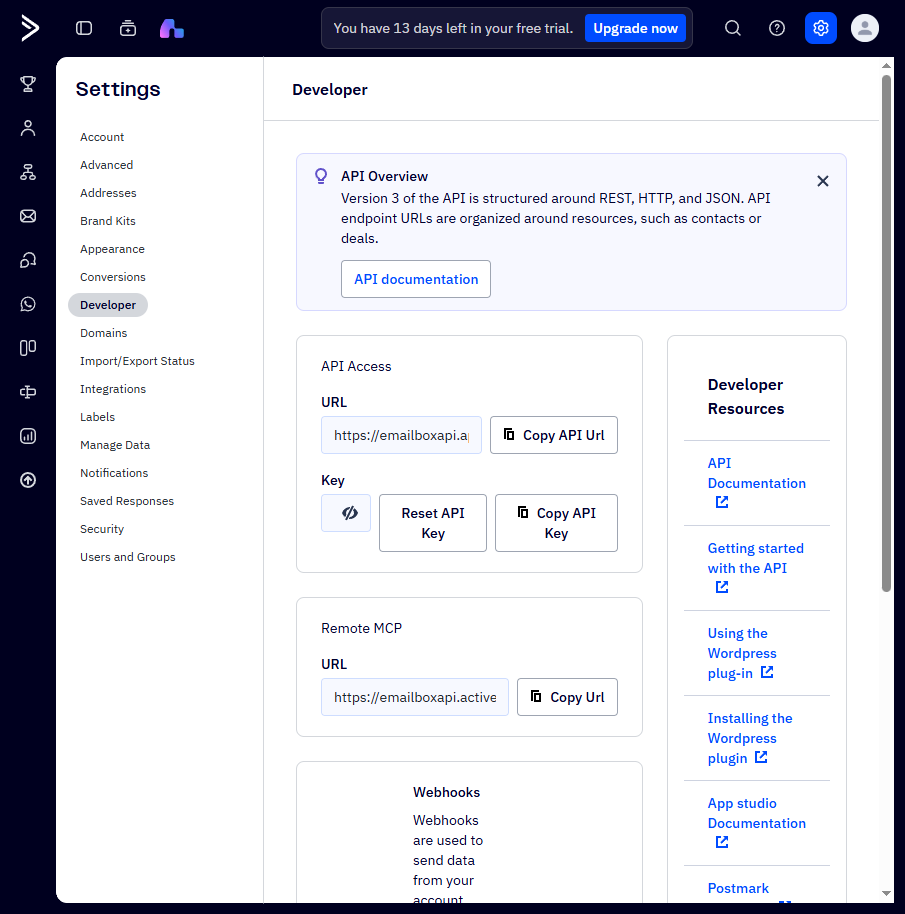
- Click Settings (gear icon, bottom left) and choose Developer.
- Under API Access you'll see:
- URL - looks like
https://youraccount.api-us1.com - Key - a long string (72 characters)
- Copy both.
Step 2 - Paste them into Myuser
- In Myuser open Product Settings -> Integrations.
- Scroll to Integrate into your CRM -> ActiveCampaign.
- Paste the API URL in the first field and the API key in the second.
- Click Test integration - Myuser calls your account live and saves both values automatically when the test passes.
What to expect
- The test only reads your user profile - nothing is created.
- Contacts pushed from Myuser are upserts: safe to run repeatedly, your existing contacts are updated rather than duplicated.
- Notes appear on the contact under "Recent activities" with the email subject or meeting time.
Troubleshooting
- "Invalid URL": use the API URL from the Developer page (
.api-us1.com), not your login URL (.activehosted.com). - "Invalid key": keys can be reset from the same Developer page - if someone clicked Reset API Key, the old key stops working immediately.
- Contact not visible in a list? Myuser creates contacts unlisted; your automations or a manual list subscription decide where they go (by design - we don't guess your list structure).
- Agency running several AC accounts? Each Myuser product connects to one AC account; use Link from another product to copy credentials between products that share an account.